


Aruba Instant On 1960 48G 2XGT Managed Switch JL808A#ABA
Aruba Instant On 1960 48G 2XGT Managed Switch JL808A#ABA
You save $698.01 (41%)
Part Number : JL808A
Availability: In stock
Couldn't load pickup availability


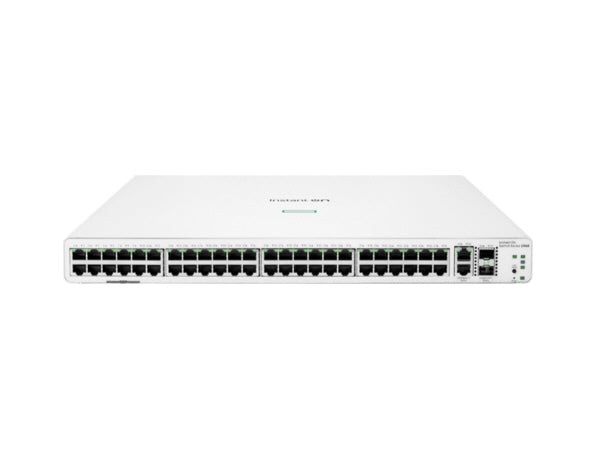

Description: Aruba Instant On 1960 48G 2XGT Managed Switch JL808A#ABA
BRAND NEW. FACTORY SEALED. FULL ARUBA WARRANTY INCLUDED. FROM CHICAGO COMPUTER SUPPLY
Overview
The Aruba Instant On 1960 48G 2XGT Managed Switch JL808A#ABA is a smart-managed, fixed-configuration Gigabit switch built for small and growing businesses that need speed today and room to scale tomorrow. You get 48 Gigabit RJ-45 ports for endpoints, then you step up to faster backbone connectivity with two 10GBase-T uplinks and two 10Gb SFP+ uplinks.
This switch fits modern, bandwidth-heavy environments where voice, video meetings, and cloud apps run all day. Management stays flexible too. You can run it through a local web GUI or manage it through the Instant On app and cloud portal, depending on how your team prefers to work.
Key Features
- 48 × 10/100/1000 Gigabit Ethernet RJ-45 ports
- 2 × 10GbE RJ-45 uplink ports for high-speed aggregation
- 2 × 10GbE SFP+ uplink ports for fiber-ready uplinks
- Smart-managed design with Layer 2 feature support
- Built for growth with stacking-ready architecture
- Security features include DoS protection and RADIUS authentication
- Supports IPv4 and IPv6 for mixed and modern networks
Technical Specifications
Brand: Aruba
Part Number / SKU: JL808A#ABA
Device Type: Smart-Managed Gigabit Ethernet Switch
Layer Services Supported: Layer 2
Ports (Downlinks): 48 × 10/100/1000 Mb/s Gigabit Ethernet (RJ-45)
Uplinks: 2 × 10Gb Ethernet (RJ-45), 2 × 10Gb SFP+
MAC Address Table: 16K
Supported Protocols: Auto-MDIX/MDI, Auto-VoIP, IGMP Snooping, IPv4, IPv6, Link Aggregation, RADIUS, SNMPv1/v2c/v3
Security Features: DoS attack prevention, RADIUS authentication
Static Routes: 32
Supported IEEE Standards: 802.1q/p, 802.3, 802.3ab, 802.3u
Latency: 1.1 to 4.4 µs
Forwarding Rate: 131 Mpps
Switching Bandwidth: 176 Gb/s
CPU: 800 MHz Cortex-A9 Single-Core
Power Draw: 120W (Max), 80W (Idle)
AC Input: 100–240 VAC, 50/60 Hz
Cooling System: Passive
Operating Temperature: 0 to 40°C (32 to 104°F)
Operating Humidity: 15% to 95%
Dimensions: 17.4 × 13.8 × 1.73 in (442.5 × 350.5 × 43.95 mm)
Weight: 9.7 lb (4.4 kg)
Use Cases
The Aruba JL808A is a strong fit when you need lots of Gigabit access ports for teams, devices, and meeting rooms, plus faster uplinks to prevent congestion at the core. Companies commonly deploy it as an access-layer switch in offices, schools, retail spaces, and multi-room facilities where voice traffic, video conferencing, and cloud workloads compete for bandwidth. It also works well when you want clean, long-term growth, because the uplink mix supports both copper 10G and SFP+ fiber paths, allowing you to expand without redesigning the network.
Why Choose Aruba JL808A
- Keeps access simple with 48 Gigabit ports, then adds 10Gb uplinks for speed where it counts.
- Reduces bottlenecks with 176 Gb/s switching bandwidth and 131 Mpps forwarding
- Supports modern security and management expectations without enterprise complexity
- Passive cooling helps in quieter racks and office network rooms
- New, factory-sealed hardware backed by Aruba warranty coverage
FAQs
What makes JL808A different from standard 48-port Gigabit switches?
It pairs 48 Gigabit access ports with both 10GBase-T uplinks and SFP+ uplinks, so you get flexible high-speed aggregation options.
Does JL808A support Layer 3 routing?
It focuses on Layer 2 services and includes limited static routing entries, which helps in simple segmentation scenarios without full Layer 3 switching.
Can I use both copper and fibre uplinks simultaneously?
Yes. You can design uplinks using the 10Gb RJ-45 ports, the 10Gb SFP+ ports, or a mix based on your cabling and distance needs.
What management methods can I use?
You can manage it through a local web GUI, and you can also use the Instant On app and cloud-based portal for remote-friendly administration.
What security controls do we get?
It supports RADIUS authentication, SNMPv3, and DoS attack prevention to help protect access and management traffic.